One of the old-school Mac/OS X tools I use is KeyBoard Maestro. It lets you record macros to automate repetitive tasks, provides a clipboard history, and is generally a handy tool that makes me more productive. Today I’m going to share a macro that saves me from minor frustration every time I use it: reformatting MAC addresses.
One of the roles I’ve done throughout my career is network admin. This means that I have to deal with MAC addresses (unique Ethernet hardware addresses for network devices). I often use a MAC Address to track down where a device is on the network, what IP address it has, etc. They are a 48-bit address usually written as six hexadecimal pairs (called octets) separated by colons or dashes. Cisco, apparently just to be different, sometimes represents them as three groups of four hex digits.
So these are all the same MAC address, formatted slightly differently:
- AC:C1:8E:6A:48:11
- AC-C1-8E-6A-48-11
- ACC1.8E6A.4811
The problem is that various networking tools use/expect addresses in different formats. For example, my old security camera system used pairs of hexadecimal digits separated by dashes (AC-C1-8E-6A-48-11). In contrast, the new camera system has a feature to add cameras by their MAC address, which must be separated by colons (AC:C1:8E:6A:48:11). The Meraki console also expects colons, so I often have to reformat MAC addresses.
Reformatting one address by hand is mildly annoying. Having to do it repeatedly drives me to script or automate!
Enter KeyBoard Maestro:
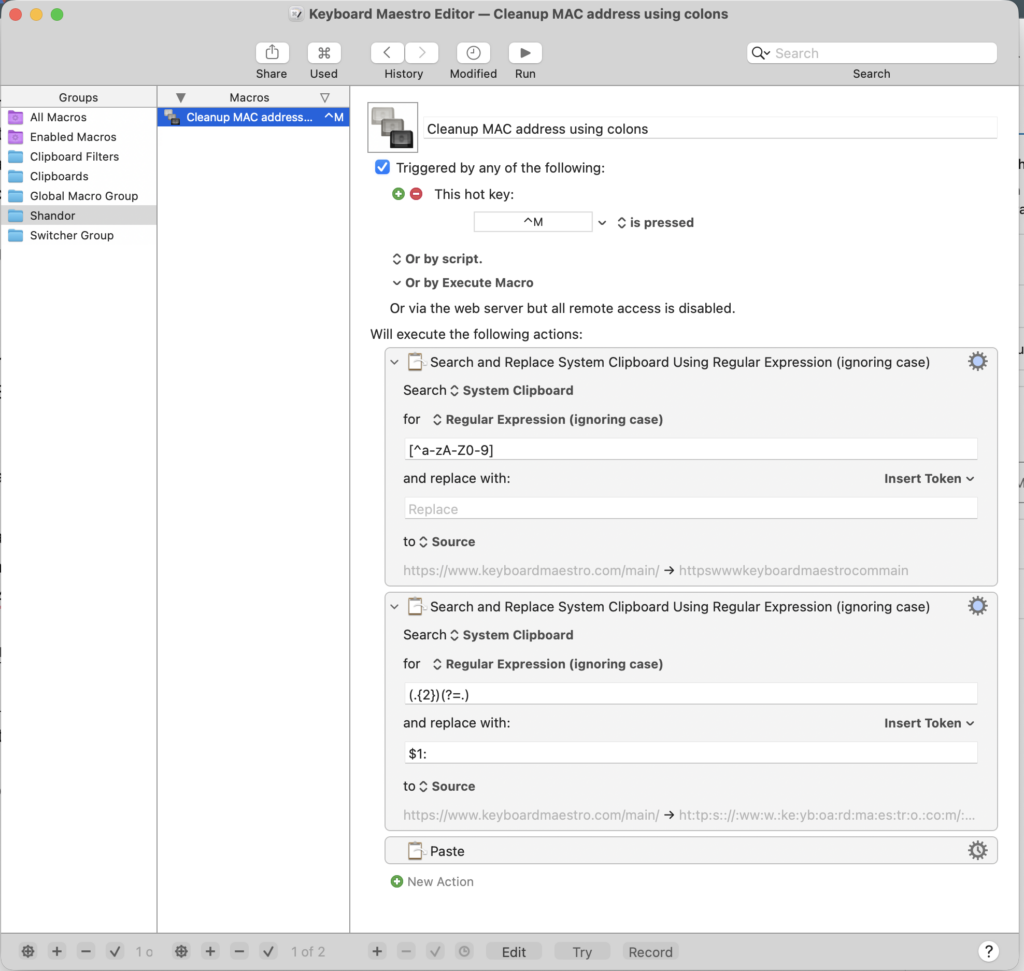
The screenshot shows a Keyboard Maestro macro I made that takes whatever value is in the clipboard, removes any symbols (with a regular expression), and then adds colons between pairs of characters (another regular expression). Finally, it pastes the newly reformatted MAC address. I’ve assigned a hotkey (control-M) to trigger the macro. Now I can copy a MAC address, go to where I want to use it, and trigger my macro to paste the reformatted MAC address.